
Product documentation
The Agent Integration Platform provides a reusable integration layer for Dynamics 365 Finance & Operations landscapes. It brings together Azure-based processing, a Power App configuration frontend, Dynamics 365 Finance & Operations staging components and reusable business connectors into one structured integration model.
The main value is that integrations become more structured, visible and maintainable. Connections are centralized, tasks and jobs are configurable, mappings are separated from core processing, staging improves validation and monitoring gives support teams the information needed to operate and troubleshoot interfaces effectively.
The platform is therefore both standardized and flexible. It standardizes common integration mechanics while still allowing customer-specific process rules, mappings and connector extensions where they add real business value.
The platform can be understood as three cooperating layers that each have a clear responsibility. The Power App frontend is used for configuration, operations and monitoring. The Azure Function App backend engine executes integration jobs, transformations and technical processing in Azure. The Dynamics 365 Finance & Operations component contains the ERP-side staging structures, parameters, custom data entities and business logic needed to process integration messages close to the business process.
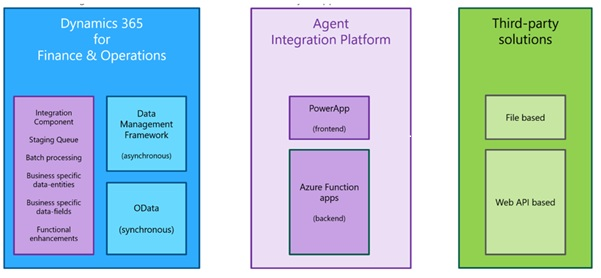
The frontend application is implemented as a model-driven Power App and provides the user-facing configuration and operations layer of the platform. It is used by consultants, administrators and support users to maintain integration setup, monitor execution and operate integrations in a controlled way.
Typical configuration maintained in the frontend includes connections, source and destination definitions, transformation tasks, integration jobs, schedules, mappings and connector parameters. The Power App does not contain the heavy processing logic. Its main purpose is to make the integration model visible, maintainable and reusable, while allowing technical integration settings to be managed in a business-friendly way without turning every configuration change into a development project.
The backend engine is implemented with Azure Function Apps and supporting Azure services. It executes the technical processing behind the integration model, including running integration tasks, responding to scheduled or event-based triggers, reading and writing files or messages, transforming data, calling APIs and coordinating follow-up actions.
Function responsibilities can be separated by purpose, for example for configuration support, real-time processing and Data Management Framework automation. The backend is deliberately decoupled from Dynamics 365 Finance & Operations, allowing the Agent Integration Platform to process file-based and message-based integrations, handle retries and logging, and interact with multiple external systems without placing all orchestration logic inside the ERP application.
The Dynamics 365 Finance & Operations component provides the ERP-side implementation of the business connectors. It contains the integration parameters, staging queues, custom data entities, validation logic and batch processes required to process integration messages inside D365FO. This component converts generic or external messages into controlled ERP transactions and keeps business-specific rules close to the application where the business data is managed.
For example, an incoming sales order can first be transformed by the backend engine and then submitted to a staging structure through a package API or OData call. From there, the connector component validates the message and processes it into the standard Dynamics 365 Finance & Operations sales order tables using D365FO business logic.
Integration scenarios differ in timing, volume and business impact. Some processes require an immediate response, such as checking a price or retrieving a status. Other processes are better handled asynchronously, for example when importing large order files or exporting high-volume master data. The Agent Integration Platform supports both synchronous and asynchronous integration styles, and the preferred pattern depends on the required response time, expected volume, process criticality and the capabilities of the connected systems.
In practice, a strong implementation combines multiple integration patterns. High-volume master data and transactional imports are usually handled asynchronously, while status requests, calculations and operational triggers are better suited to synchronous or event-driven processing.
Connections define the endpoints used by integration tasks. A connection can represent a source system, a destination system or a supporting service. By separating connection setup from job design, endpoints can be reused across multiple integrations, environments and business scenarios.
Authentication and technical access are part of the connection concept. Endpoint details, credentials and technical parameters should be maintained centrally in Azure Key Vault or equivalent secure configuration, rather than being hard-coded into individual interfaces.
An integration task represents one functional processing step within an integration flow. It defines what data is read, where the data comes from, how it is transformed, where the result is written and which follow-up action may be required. An integration job combines one or more tasks into a complete end-to-end process.
Jobs can be started manually, executed on a schedule or triggered by an event. Manual execution is useful during testing, troubleshooting and support. Scheduled execution supports recurring imports and exports, while event-based execution allows the Agent Integration Platform to respond when a file arrives, a message is received or a business event is published.
1. Receive the source file or message and store the original payload for traceability.
2. Transform the source format into a generic or canonical structure.
3. Map the generic structure to a connector-specific or Dynamics 365 Finance & Operations staging structure.
4. Submit the mapped result through OData, a package API, a custom service or a file-based destination.
5. Execute follow-up processing, such as validation, posting, status retrieval, archiving or notification.
6. Log the technical and functional result so the process can be monitored, analysed and reprocessed when needed.
Mapping and transformation are central to the Agent Integration Platform because external applications often use different message structures, terminology and technical formats. The platform bridges these differences by converting data between common integration formats and by keeping business-specific mappings separate from the core integration process. This makes mappings easier to maintain, reuse and adjust without changing the overall job design.
For XML-based mappings, XSLT can be created and maintained with tooling such as Altova MapForce. For JSON-based integrations, mappings can translate source properties into the target payload structure expected by the receiving system. The key architectural principle is to isolate mapping differences from the business process as much as possible, so format-specific changes do not affect the overall integration flow.
Staging provides a controlled holding area for incoming integration data before it is processed in Dynamics 365 Finance & Operations. Messages are received and stored in a queue, where they can be validated, reviewed and corrected before they affect ERP transactions. This separation between technical receipt and business processing prevents issues such as formatting errors, incomplete order data or missing references from immediately disrupting the ERP process.
This approach is especially important for inbound transactions such as sales orders, purchase confirmations, warehouse updates and shipment messages. The staging component in Dynamics 365 Finance & Operations can contain connector-specific tables and custom entities that support validation rules, functional error messages, status management and batch processing. By keeping the original payload available, users can correct errors and reprocess messages in a controlled way without losing traceability.
Monitoring and logging provide the operational visibility needed to support integration processes effectively. When an integration fails, support users must be able to determine what was received, which task processed the message, which transformation was applied, which endpoint was called and what the final result was. The Agent Integration Platform supports this by capturing both technical detail and functional context, so incidents can be analysed, corrected and reprocessed in a controlled way.
Advanced monitoring can also use Azure Function App logging, log streams and configurable log levels. This allows support teams to investigate both the Azure execution layer and the Dynamics 365 Finance & Operations processing layer, giving them a complete view of where an issue occurred and how it should be resolved.