
Product documentation
The Price and Margin Management product contains several features which extends the standard price and margin management features of Microsoft Dynamics 365 for Finance and Operations .
The product gives you the ability to automatically calculate a base sales price list or discounted sales price list, up from a purchase price through a cost price and generate a commercial cost price with different margin layers.
By linking an employee to a specific margin layer you can control the amount of discount he can give before a margin alert will appear.
In standard Microsoft Dynamics 365 for Finance and Operations margin targets are set on a company level and are applicable to all items. In our product the granularity of margin targets can be controlled by a free definable category hierarchy which even allows you to exclude items from a margin check.
Besides calculating sales prices and a more granular control of margins, our product also offers functionality to use the standard functionality in a more efficient way by introducing an overview of all retail prices and discounts from the perspective of an item, a customer or a channel.
Especially when you want to setup customer specific retail prices and discounts the setup can become a cumbersome process as you have to create and link customer specific price groups and affiliations. In our product you can do this in just one click per customer.
A complete overview of all features can be found further down in this document.
The cost to sales price calculation and advanced margin alerts functionality is built on top off Call center sales orders. With this product the prices stored in existing retail price adjustments or discount agreements can be calculated based on purchase prices and charges.
Important
A call center is a channel within the Retail module. There are no modifications made to the other channels (Stores and On-line) within the Retail module to support these features.
From of version 1010.34.610 a new feature Automatically create a cost / sales price line, has been implemented which makes it possible to calculate the cost price levels for order lines even if there is no retail price adjustment found. This makes it also possible to use the multiple margin levels for non-retail orders.
From of version 10017.41.1500 a new feature Sales price lists, had been implemented which makes it possible to use the multiple margin levels for non-retail orders based on trade agreement prices.
The price unit functionality described in this document is supposed to work on both retail and non-retail orders, but has not been implemented for Mpos and On-Line channels.
Also be aware that when using the standard Retail call center orders some legacy features will not work or will have a different behavior in comparison to legacy sales orders.
Price and Margin Management is an enhancement built on top of the legacy Supply Chain and Commerce pricing framework. With version 10.0.43, Microsoft introduced Pricing Management also known as Unified Pricing Management.
Both Price and Margin Management and Unified Pricing Management provide pricing functionalities.To prevent conflicts when both features are active, the system restricts users from creating or opening Sales Orders and Sales Quotations when both are enabled simultaneously. Simultanious use is now available as BETA feature.
When both Price and Margin Management and Unified Pricing Management are enabled, users cannot:
To bypass this restriction, one of the following configurations must be adjusted.
This last option enables Price and Margin Management and Unified Pricing Management to function together as a beta feature, allowing testing and evaluation of both pricing systems in combination
Important
The features of Price and Margin Management can be grouped into several areas:
This will enable the Price and Margin Management functionalities.
Specific setup related to the features are described in the topics it self.
In order to use the trade agreement purchase prices, the user has to activate the price and discount parameters in the Procurement and Sourcing > Setup > Prices and discounts > Activate price/discount parameters.
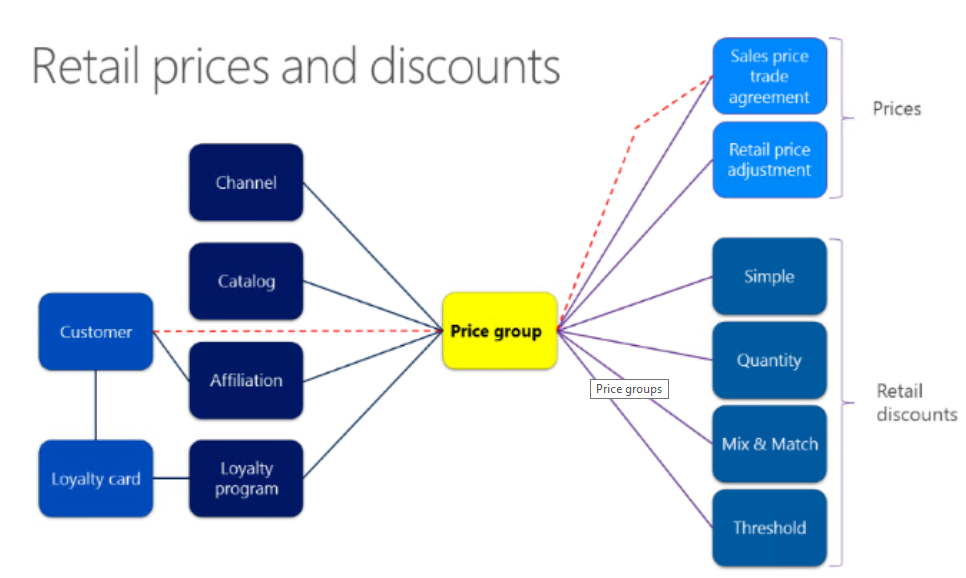
With the cost to sales price calculation function it is possible to update the prices in Retail price adjustments and discount agreements. In order to activate the retail pricing on a sales order or quotation, the user must be linked to a call center and the price group attached to the agreements needs to be attached to the call center or the price group needs to be linked via an affiliation to the customer.
https://docs.microsoft.com/en-us/dynamics365/unified-operations/retail/price-management
Important
|
Date |
Release Notes |
Version |
|
09-10-2026 |
10049.33451458.49228.183341 |
|
27-08-2026 |
10048.33450816.49228.171994 |
|
30-07-2026 |
10048.33450472.49228.164222 |
|
12-06-2026 |
10048.33449850.49228.150602 |
|
27-03-2026 |
10047.26031700.48710 |
|
27-02-2026 |
10046.25121702.48144 |
|
30-01-2026 |
10046.25121701.47531 |
|
09-01-2026 |
10046.25121700.47288 |
|
26-11-2025 |
10045.25091802.46743 |
|
31-10-2025 |
10045.25091801.46000 |
|
26-09-2025 |
10045.25091800.45943 |
|
29-08-2025 |
10044.25052302.45263 |
|
25-07-2025 |
10044.25061201.44818 |
|
20-06-2025 |
10044.25061200.44309 |